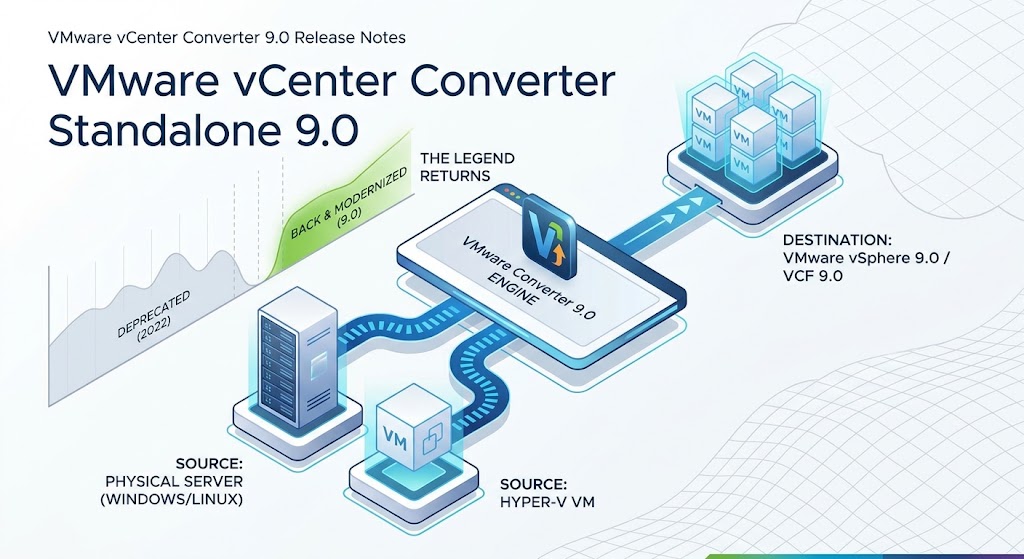
If you’ve been working as a VMware administrator or systems engineer for any length of time, chances are you have fond memories of VMware vCenter Converter Standalone.
For well over a decade, Converter was the undisputed Swiss Army knife of the data center. Whether you were tasked with migrating a legacy bare-metal server, consolidating branch-office hardware into a vSphere cluster, or converting virtual machines from hypervisors like Hyper-V, Converter was the go-to tool that simply got the job done.
So, when VMware officially deprecated and removed Converter Standalone from downloads back in 2022 due to security debt and legacy codebase challenges, many in the community felt a major void. Modernising legacy physical workloads suddenly required complex workarounds, third-party utilities, or manual lift-and-shift routines.
Now for the good news: VMware vCenter Converter is back!
Recognising the indispensable role this tool played in IT operations, Broadcom has brought Converter out of retirement and given it a modern facelift. With the official release of VMware vCenter Converter Standalone 9.0, engineers once again have an officially supported, security-hardened tool to streamline P2V (Physical-to-Virtual) and V2V (Virtual-to-Virtual) migrations.
Here is a full breakdown of why Converter 9.0 matters, what’s new under the hood, and how it fits into modern environment designs.
What Is VMware vCenter Converter Standalone?
At its core, vCenter Converter Standalone automates the creation of VMware virtual machines from existing physical hardware or non-vSphere virtual machine formats.
It allows you to convert:
- Physical Servers (P2V): Live Windows and Linux machines converted directly into vSphere virtual machines.
- Third-Party Hypervisors (V2V): Offline virtual machines from Microsoft Hyper-V servers or public cloud instances like Amazon EC2.
- Desktop Workstation Formats: Convert local VMware Workstation or Fusion VMs into managed vSphere datastores.
Through non-disruptive “hot cloning,” source servers remain online and operational during the data copying process, ensuring zero downtime for business applications during initial migration phases.
For sysadmins and cloud architects, the journey of VMware vCenter Converter Standalone has been a bit of a rollercoaster.
Once considered an indispensable tool in every VMware administrator’s toolkit, Converter was officially deprecated and removed from VMware’s product lineup back in 2022 due to aging security standards and legacy codebase challenges. However, following user demand and VMware’s acquisition by Broadcom, the tool was officially modernized and brought back.
With the release of VMware vCenter Converter Standalone 9.0, Broadcom is delivering a fully refreshed, security-hardened conversion engine designed to support modern hybrid-cloud architectures and contemporary operating systems.
What’s New in Version 9.0?
The 9.0 release isn’t just a minor patch—it introduces core alignment with Broadcom’s flagship enterprise platforms, modernised platform security, and major automation improvements.
1. Enterprise Platform Integration
- VMware Cloud Foundation (VCF) 9.0 Support: Converter 9.0 natively targets and integrates with VMware Cloud Foundation 9.0 environments.
- Virtual Hardware Version 22 Support: Support for vSphere’s latest hardware primitives and capabilities.
- vSphere 9.0 Ready: Native destination support for vSphere 9.0 infrastructure alongside older vSphere 8.0 release trains.
2. Enhanced Linux Migration Capabilities
- Post-Cloning Linux Synchronisation: You can now run incremental synchronisation tasks on Linux targets after the initial data clone. This allows for near-zero downtime cutovers when migrating live, high-churn Linux production servers.
- XFS Metadata Preservation: Preserves
CRCandftypeflags during XFS file system clones, preventing storage-level corruption and boot failures post-migration.
3. Security Modernisation & Developer API
- Full SSL Certificate Support: Replacing outdated legacy trust workflows, Converter 9.0 supports full custom SSL certificates for secure, end-to-end management network communication.
- Python SDK Support: The vCenter Converter SDK now natively supports Python, enabling DevOps and platform engineering teams to automate P2V/V2V migration workflows via modern code pipelines.
- Deprecation of Weak Cryptography: Authentication using outdated
RSA SHA1algorithms has been officially deprecated in favour of modern SHA-256 signatures and password-based flows.
Supported Source Environments & OS Highlights
| Source Type | Supported Versions |
| Windows OS | Windows 10, Windows 11, Windows Server 2012 / 2012 R2 / 2016 / 2019 / 2022 |
| Linux OS | CentOS 7.x, RHEL 7.x / 8.x / 9.x, Ubuntu 14.04 through 22.04 LTS |
| Hyper-V | Windows Server 2012 through 2022 Hyper-V hosts (Offline VMs) |
| Target Platforms | vSphere 8.0 (U1/U2/U3), vSphere 9.0, VCF 9.0, Workstation 17.x, Fusion 13.x |
Notable Fixes and Usage Changes
- UNC Paths Required for Network Shares: Selecting destination mapped drive letters (e.g.,
Z:\VMs) previously caused conversions to fail midway with generic “File not found” errors. In version 9.0, network destinations must use standard UNC paths (e.g.,\\server\share\vms). - 512-Byte Disk Sector Requirement: Native 4K (
4Kn) storage drives remain unsupported; converter workflows require512nor512edisk sector configurations on source and target disks.
How to Get Started
VMware vCenter Converter Standalone 9.0 is available for direct download via the Broadcom Support Portal.
Whether you are consolidating remaining bare-metal Windows or Linux servers, re-platforming Hyper-V hosts onto vSphere 9.0, or modernising workloads into VMware Cloud Foundation, Converter 9.0 provides a reliable path forward.