VMware NSX, VPCs, Routing, Gateways and Networking Explained for VMware Administrators
If there is one area that causes the most anxiety for VMware administrators moving into VMware Cloud Foundation, it is networking.
Most vSphere administrators are comfortable with:
• ESX
• vCenter
• Clusters
• DRS
• HA
• vMotion
But as soon as someone says:
“Create a Tier-0 Gateway.”
“Configure a VPC.”
“Deploy a Transit Gateway.”
“Troubleshoot North-South Routing.”
Many administrators suddenly find themselves outside their comfort zone.
This is completely normal.
For years, networking lived outside the VMware stack.
Infrastructure teams built virtual machines.
Network teams built networks.
VMware Cloud Foundation changes that model entirely.
In VCF, networking becomes part of the platform.
Understanding NSX is no longer optional.
It is fundamental.
The good news is that once you understand the architecture, NSX becomes surprisingly logical.
The bad news is that many people try to learn NSX by memorising screens and menus instead of understanding how traffic actually flows.
This chapter will focus on understanding.
Because once you understand the architecture, troubleshooting becomes much easier.
The Evolution of VMware Networking
Let’s start with traditional vSphere networking.
In a traditional environment, the network looked something like this:
Virtual Machine
↓
Port Group
↓
vSwitch
↓
Physical NIC
↓
Physical Switch
↓
Router
↓
Firewall
↓
Network
The virtualisation team controlled only a small part of this path.
Everything beyond the physical NIC belonged to another team.
Every network request became a ticket.
Every VLAN required coordination.
Every firewall rule required approval.
Every routing change required another team.
Cloud providers solved this problem years ago.
AWS does not raise a network ticket every time someone creates a VPC.
Azure does not require a network engineer to manually provision every subnet.
Networking became software.
VMware’s answer to this challenge was NSX.
What Is NSX?
The easiest way to describe NSX is this:
NSX virtualises networking in the same way ESX virtualises compute.
Before ESX:
Applications required physical servers.
After ESX:
Applications run on virtual servers.
Before NSX:
Applications required physical networking.
After NSX:
Applications run on virtual networking.
This is a profound shift.
The network becomes software.
Routing becomes software.
Firewalls become software.
Load balancing becomes software.
Security becomes software.
Everything becomes programmable.
Once you understand this concept, the entire NSX architecture starts making sense.
The Three Planes of NSX
One of the most important concepts for the VCF exam is understanding the three planes of NSX.
Many administrators skip this topic.
That is a mistake.
Because almost every NSX component belongs to one of these planes.
Management Plane
The management plane is responsible for configuration.
This is where administrators interact with NSX.
Historically this was performed through NSX Manager.
In modern VCF deployments, networking operations are increasingly integrated through vCenter and VMware Cloud Foundation.
The management plane stores:
Policies
Network definitions
Security rules
Gateway configurations
Segment definitions
VPC definitions
Think of the management plane as the “brain.”
It decides what the network should look like.
Control Plane
The control plane distributes information.
Its job is determining:
Where workloads exist.
How traffic should flow.
Which routes should be advertised.
Which gateways should be used.
The control plane takes information from the management plane and distributes it throughout the environment.
Think of the control plane as the “decision maker.”
Data Plane
The data plane carries traffic.
This is where packets actually move.
Virtual machines communicate through the data plane.
Applications communicate through the data plane.
Users connect through the data plane.
Think of the data plane as the “road.”
Most troubleshooting ultimately happens here.
Understanding NSX Segments
One of the first things administrators create in NSX is a Segment.
A Segment is effectively the modern replacement for a traditional VLAN.
However, there is an important difference.
Traditional VLANs exist on physical switches.
Segments exist entirely within software.
Imagine creating:
Production Segment
Development Segment
Database Segment
Management Segment
Each segment can be created instantly.
No switch changes.
No network tickets.
No waiting.
This is one of the biggest operational advantages of NSX.
Segments provide Layer 2 connectivity for workloads.
Virtual machines connected to the same segment can communicate directly.
For exam purposes:
If VMware asks where workloads connect in NSX, the answer is usually Segments.
Understanding Tier-0 Gateways
Once workloads exist on a segment, they need a way to reach external networks.
This is where Tier-0 Gateways come into play.
A Tier-0 Gateway sits at the top of the NSX routing hierarchy.
Its primary responsibilities include:
North-South Routing
External Connectivity
BGP Routing
Route Advertisement
Connecting NSX to the physical network
Think of Tier-0 as the bridge between the virtual world and the physical world.
Without a Tier-0 Gateway, workloads remain isolated.
A useful analogy:
Tier-0 Gateway = Internet Router
Segments = Local Streets
Tier-1 Gateways = Local District Roads
Understanding this relationship makes the architecture much easier to visualise.
Understanding Tier-1 Gateways
Tier-1 Gateways sit beneath Tier-0 Gateways.
Their purpose is workload isolation.
You might create:
Development Tier-1
Production Tier-1
DMZ Tier-1
Testing Tier-1
Each Tier-1 can own:
Segments
Policies
Routes
NAT Rules
Load Balancers
Firewall Rules
Traffic flows:
Segment
↓
Tier-1
↓
Tier-0
↓
Physical Network
This hierarchy is one of the most common exam topics.
You should be able to draw this architecture from memory.
Understanding Distributed Routing
Traditional routing requires traffic to travel through a physical router.
This creates bottlenecks.
NSX introduced distributed routing.
Instead of routing through a central appliance, routing occurs directly on the ESX host.
This dramatically reduces latency.
Imagine two VMs:
Web Server
Database Server
Traditional networking:
VM → Switch → Router → Switch → VM
NSX Distributed Routing:
VM → VM
Much shorter path.
Much faster performance.
This is one of the reasons NSX scales so effectively.
Understanding Distributed Firewalls
Traditional firewalls sit at the edge of the network.
They inspect traffic entering and leaving.
But what about traffic inside the data centre?
Historically that traffic was often unprotected.
NSX solves this problem using Distributed Firewall.
The firewall exists directly inside the hypervisor.
Every ESX host becomes a firewall.
Every workload becomes protected.
This enables micro-segmentation.
What Is Micro-Segmentation?
Micro-segmentation is one of the most important concepts in modern security.
Imagine a ransomware attack.
Without micro-segmentation:
One compromised server may access hundreds of others.
With micro-segmentation:
Communication is restricted.
Movement is controlled.
Attack spread is limited.
Instead of protecting only the perimeter, NSX protects every workload.
For VCF administrators this becomes increasingly important because modern security architectures assume breach.
The goal is containment.
Not prevention alone.
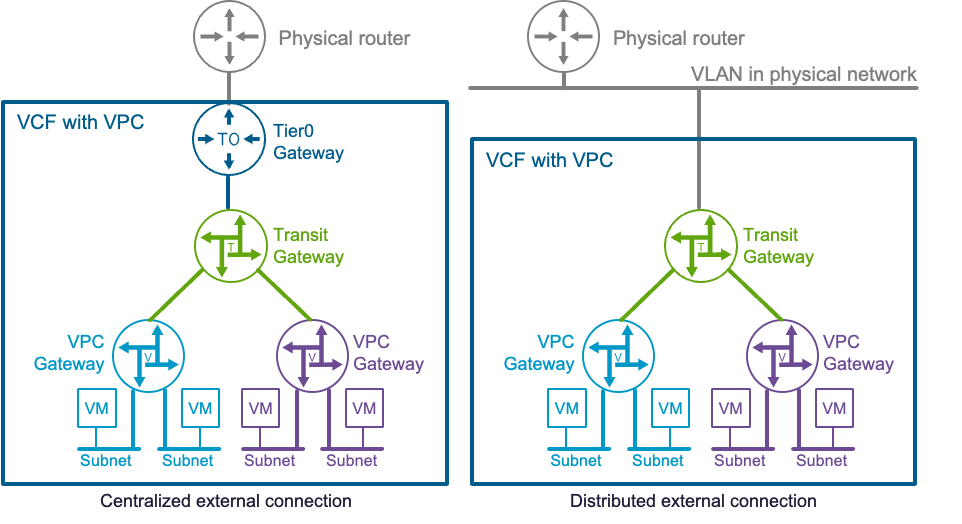
Understanding VPCs in VCF 9.1
One of the biggest enhancements introduced in VCF 9 and expanded further in VCF 9.1 is Virtual Private Clouds (VPCs).
AWS users will immediately understand the concept.
A VPC provides:
Network Isolation
Address Space Isolation
Tenant Isolation
Policy Isolation
Resource Isolation
Each tenant receives their own logical network environment.
Think of a VPC as a private network operating inside a larger shared infrastructure platform.
This is critical for:
Platform Teams
Service Providers
Multi-Tenant Environments
Development Teams
Large Enterprises
Instead of manually building networking for every application team, VCF can provide self-service isolated environments.
This is where VMware is clearly moving.
Infrastructure becomes a platform.
Networking becomes self-service.
Transit Gateways
As environments grow, VPCs need connectivity.
This introduces another challenge.
How do multiple VPCs communicate?
The answer is Transit Gateways.
A Transit Gateway acts as a central routing hub.
Instead of creating hundreds of network peering relationships, all connectivity passes through the Transit Gateway.
Benefits include:
Simplified Routing
Centralised Connectivity
Reduced Complexity
Improved Scalability
This concept appears frequently in modern cloud networking architectures.
VCF 9.1 continues to strengthen these capabilities.
Understanding North-South Traffic
North-South traffic refers to traffic entering or leaving the environment.
Examples include:
Internet Access
User Access
External Services
API Connectivity
Partner Connectivity
Traffic Flow:
VM
↓
Segment
↓
Tier-1
↓
Tier-0
↓
Physical Router
↓
Internet
Whenever users access applications from outside the environment, North-South traffic is involved.
Understanding East-West Traffic
East-West traffic remains inside the data centre.
Examples include:
Web Server → Database Server
Application → API Server
Kubernetes Node → Kubernetes Node
VM → VM
This traffic often represents the majority of network traffic inside enterprise environments.
NSX is particularly powerful here because distributed routing and distributed firewalling optimise East-West communication.
The Most Common NSX Troubleshooting Scenarios
For the exam and real-world administration, start troubleshooting in this order:
Can the VM reach its local segment?
Can the segment reach the Tier-1 Gateway?
Can the Tier-1 Gateway reach Tier-0?
Can Tier-0 reach the external network?
Are firewall rules blocking traffic?
Are routes being advertised correctly?
Is DNS functioning correctly?
Many administrators immediately blame NSX.
The problem is often DNS, routing, or firewall policy.
Follow the traffic path methodically.
What VMware Is Really Testing
The VCF certification is not trying to turn you into a CCIE.
VMware is not expecting deep network engineering expertise.
What VMware wants is something simpler.
Can you understand how workloads connect?
Can you understand how traffic flows?
Can you understand where to troubleshoot?
Can you understand the relationship between Segments, Tier-1 Gateways, Tier-0 Gateways, VPCs, Transit Gateways and Distributed Services?
If you can answer those questions confidently, you are already ahead of most candidates preparing for the VCF certification.
In Part 4 we move into storage, covering vSAN, ESA, storage policies, supplemental storage, lifecycle management, stretched clusters, storage troubleshooting and the storage architecture that powers modern VMware Cloud Foundation environments.
This chapter is important because networking, NSX, VPCs, routing, gateways, distributed firewalling, and troubleshooting are often the biggest gap for experienced vSphere administrators transitioning into VMware Cloud Foundation. It is also one of the areas where understanding the architecture matters far more than memorising configuration screens.